Move a scene. The paperwork keeps up.
A drag-and-drop stripboard linked to your actual script. Reorder the board and the day-out-of-days, cast availability and tomorrow's call sheet rebuild from the same data. No exporting between three apps at midnight.
Free plan forever · 14-day free trial on paid plans · No credit card required
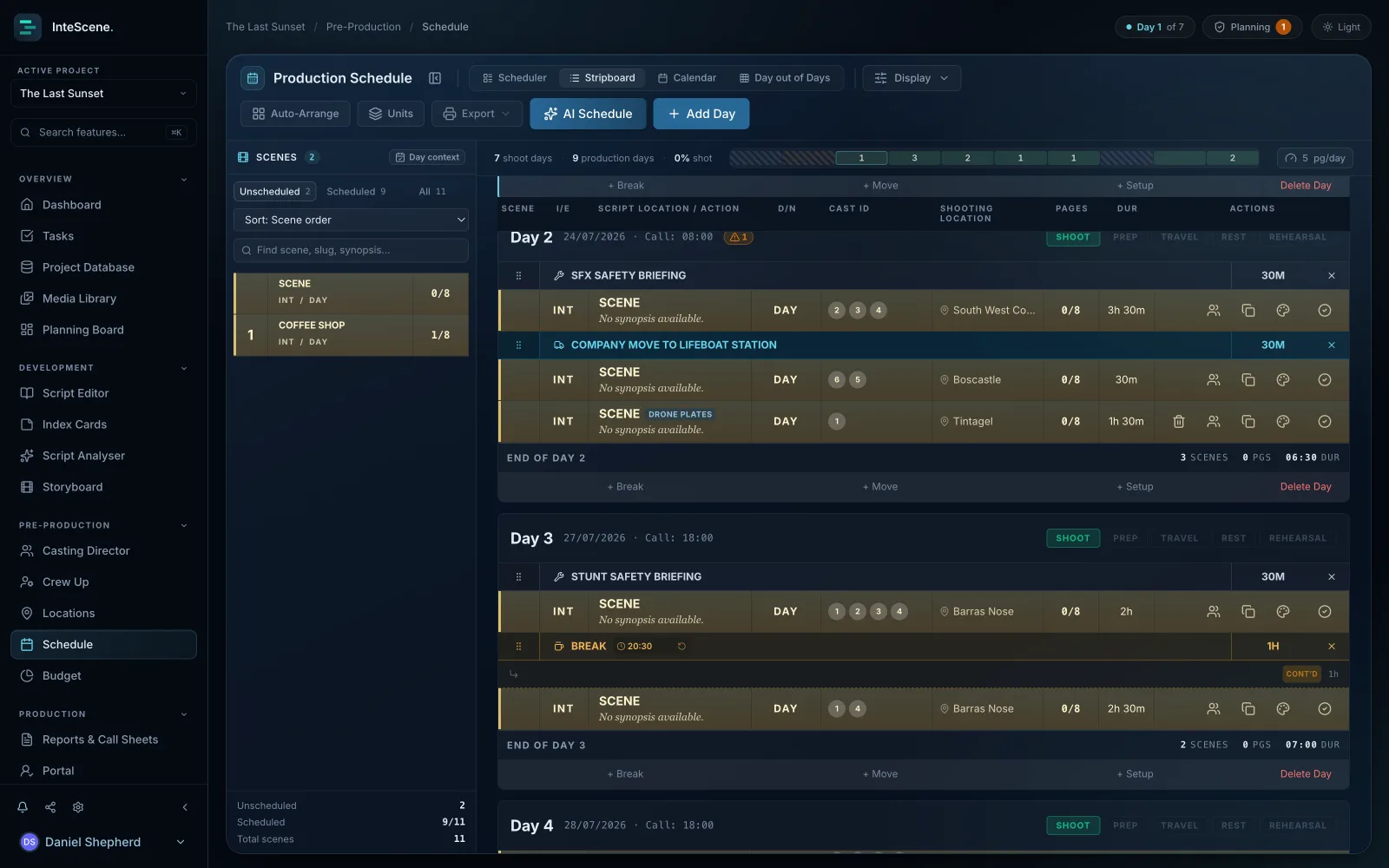
A real stripboard, digital
Colour-coded strips by INT/EXT and day/night, banners and company moves. The tool ADs actually think in, built by people who've run the board on real shoots.
Script-linked, always current
Scenes carry their breakdown with them. When a revision lands, InteScene flags every strip it touches, and you decide what moves.
Conflicts caught in prep
The double-booked actor, the illegal turnaround, the missed meal break: flagged while you plan, not discovered on the floor.
One board. Every document your production needs.
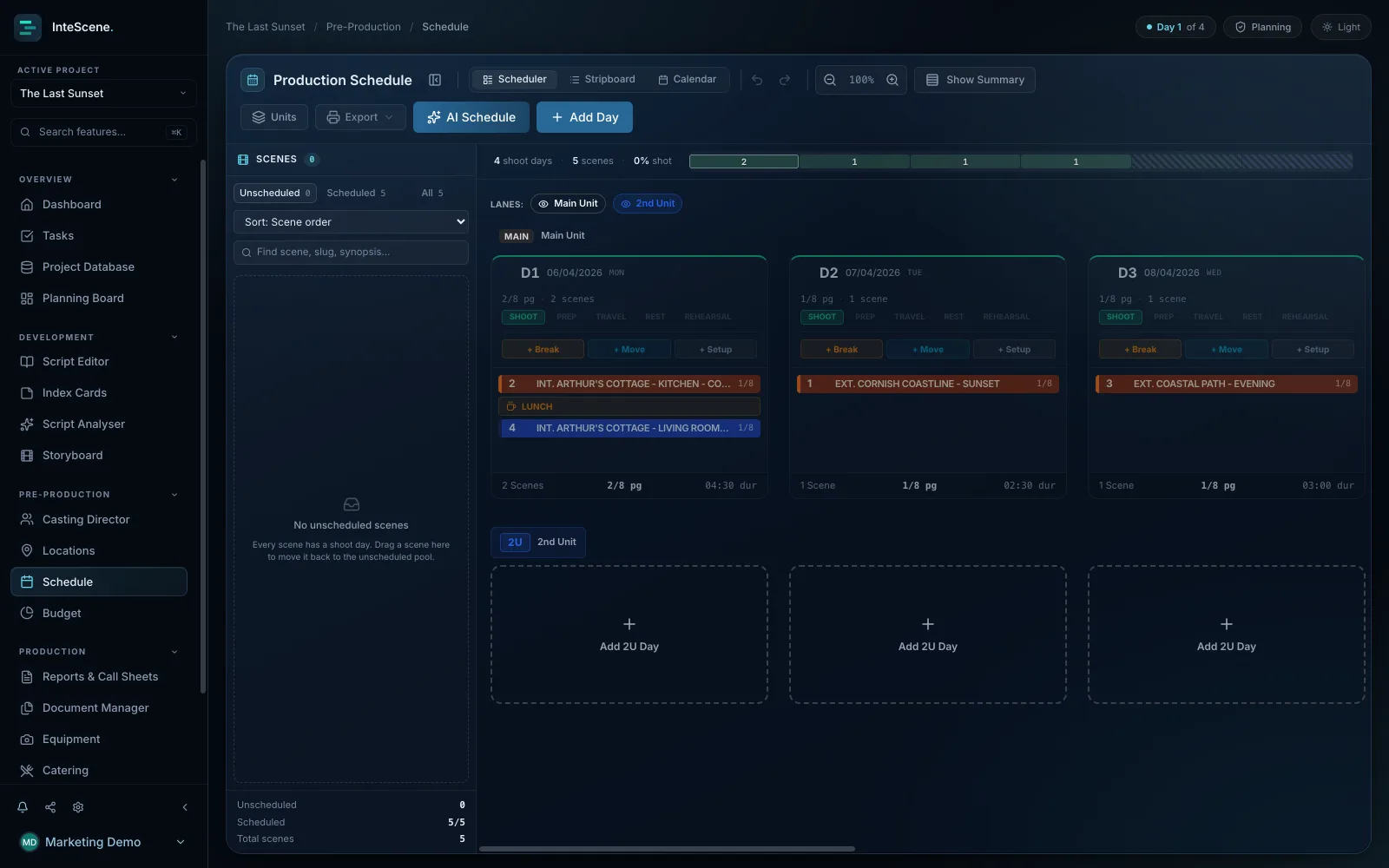
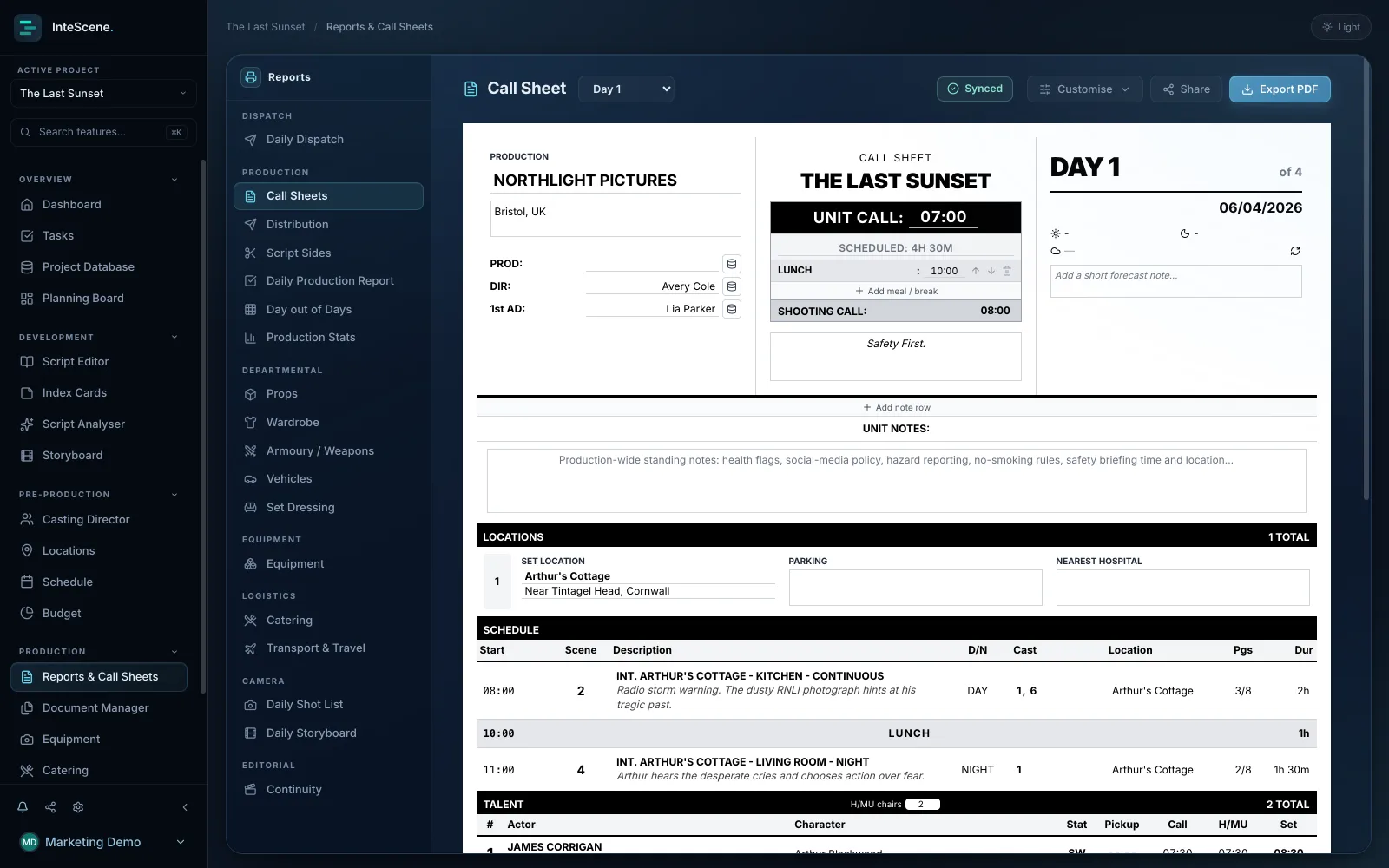
Stop rebuilding the schedule in three different apps. The stripboard, calendar view, day-out-of-days and call sheets all read from one live schedule, so none of them go stale.
What film scheduling software does
Films are almost never shot in story order, so a 1st AD builds a shooting order: the practical sequence the crew actually films in, often grouping every scene at one location together to avoid moving the unit. InteScene lets you plan the shoot the way an AD does, dragging scenes from an Unscheduled rail onto shooting days, setting the order, marking scenes as shot, and watching wrap times and page counts calculate themselves. You view the same plan three ways: a drag-and-drop board, a classic colour-coded stripboard (the strip layout ADs use to order a shoot day, with strip colours set automatically from interior/exterior and time of day), and a monthly calendar. All three drive one plan, so a change in any view updates the others.
How InteScene's AI scheduler and conflict engine work
One click asks an AI trained to think like a 1st AD to propose an optimised shooting order. It weighs cast availability, location grouping, travel time, interior/exterior and time-of-day grouping, scene complexity, and real sunrise and sunset daylight for your locations and dates. It runs a two-pass pipeline, validates its own output, and refines it to fix violations before presenting the result, so what normally takes an experienced AD days of stripboard work the AI proposes in minutes. The schedule is checked continuously by a live conflict engine that flags the expensive mistakes: cast double-bookings, actors booked on days they are marked unavailable, illegal turnarounds (too little rest between wrap and the next morning's call), over-length days and missing meal breaks, each in plain English with a suggested fix and a click-through to the exact problem. You can capture a labelled snapshot like Locked v3 and restore it later, and export the shoot to iCal or email calendar invites straight to cast.
What it replaces
InteScene's scheduler replaces the physical stripboard and the spreadsheet juggling of building a shootable order by hand, along with a separate dedicated scheduling app. Because the schedule reads from your breakdown, it also feeds the rest of the production automatically: change the order and the call sheets, sides, Day-out-of-Days grids and logistics all stay in step. The conflict engine encodes real AD knowledge so clashes surface during planning rather than on the shoot morning, when an actor is double-booked or lunch slips and triggers a meal penalty.
Quick answers
How does AI film scheduling work?
In InteScene, one click asks an AI trained to think like a 1st AD to propose an optimised shooting order. It weighs cast availability, location grouping, travel time, interior/exterior and time-of-day grouping, scene complexity, and real sunrise and sunset daylight for your locations and dates, then self-validates and refines the plan before showing it to you. You can accept, edit or rearrange the result, since you always have the final say.
Does InteScene have a digital stripboard?
Yes. The schedule includes a classic colour-coded stripboard, the strip layout assistant directors use to order a shoot day, where each scene becomes a strip whose colour is set automatically from its interior/exterior and time of day. The stripboard is one of three synced views, alongside a drag-and-drop board and a monthly calendar, all driving the same plan.
Can the software catch scheduling conflicts before the shoot?
Yes. A live conflict engine continuously checks the schedule for cast double-bookings, actors booked on days they are marked unavailable, illegal turnarounds, over-length days and missing meal breaks. Each clash is flagged in plain English with a suggested fix and a click-through to the exact problem, so issues surface during planning rather than on the shoot morning.
Can I save versions of my schedule?
Yes. You can capture a labelled snapshot of the shooting order, for example Locked v3, and restore it later, which works like version control for your shoot. You can also export the whole schedule as an iCal file or email calendar invites straight to cast, scoped to all days, selected days, or a single actor's days.

Schedule the shoot, not the software.
Made by filmmakers, for filmmakers. From your first short to a studio feature.