Free call sheet generator. Ready in minutes.
Fill in your shoot day below and download a call sheet your crew can read at a glance: call times, schedule, locations, cast and crew contacts, and the forecast, laid out properly. It takes a couple of minutes, it is free, and there is no account to create.
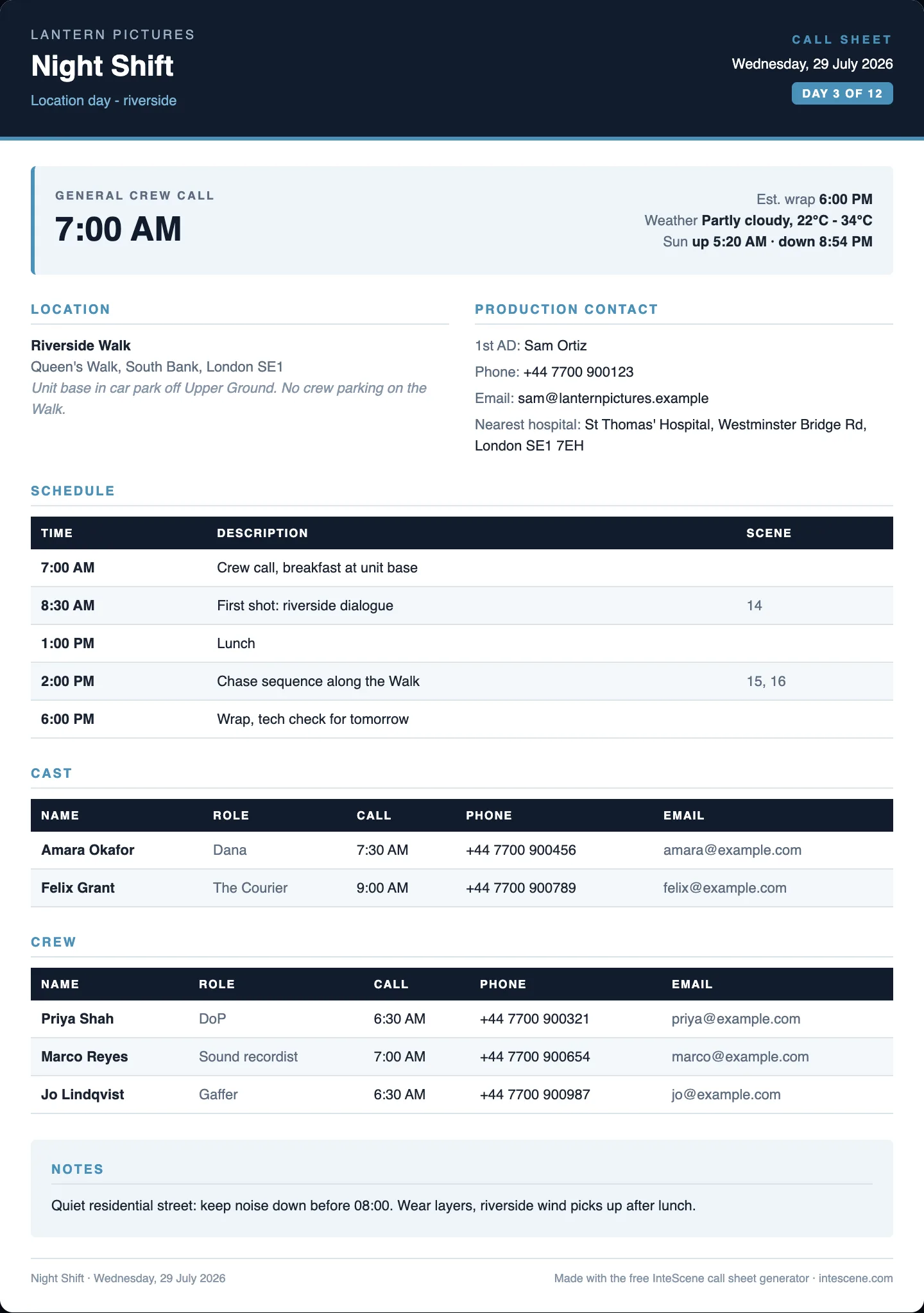
Looking for a call sheet template? You have both here: the blank Word file to fill in yourself, or the generator below, which fills itself in from your shoot day and hands back a finished PDF. Prefer to see one done first? Read three filled-in call sheet examples.
Your work is saved as you go, so you can close this tab and pick it up later. Every field is optional: anything you leave blank is simply left off the sheet.
Production
Who is shooting, and what. This fills the header of the sheet.
Shoot day
Date, call and wrap. Day 3 of 12 style numbering is optional.
Weather & light
Auto-fill pulls the Open-Meteo forecast for your shoot date (up to about 16 days ahead). Every field stays editable.
Locations
Name, full address, and anything the crew needs to know about parking or access.
Schedule
The running order of the day. Scene numbers are optional.
Cast
Individual call times override the general crew call on the sheet.
Crew
Department or role, plus contact details so nobody phones the producer at 6 AM.
Advance schedule
A heads-up on the next shoot day so departments can prep. The date you set here becomes the section heading on the sheet. Leave it all blank and the section stays off.
Department notes
One line per department: kit to bring, prep to do, anything specific to the day. Departments left blank never print.
Walkie channels
The radio plan. Rows without a department are left off the sheet.
Safety & emergency
The block every sheet should carry: emergency numbers, the nearest A&E, who holds the first aid kit.
Live preview
| Time | Description | Scene |
|---|---|---|
| Crew call | ||
| First shot | ||
| Lunch | ||
| Wrap |
Sources & how this tool works
The sheet follows standard production practice: project and company header, day number, general crew call, locations, running schedule, cast and crew lists with individual calls, safety information, and notes. Field names match what 1st ADs and production coordinators expect.
The PDF is generated locally in your browser, so your production details are never sent to or stored on our servers. Your draft is kept in this browser’s local storage only.
Weather, chance of rain, and sunrise or sunset times come from Open-Meteo when you use auto-fill (forecasts cover roughly 16 days ahead). Forecasts are estimates: check again the night before the shoot.
Quick answers
What is a call sheet?
A call sheet is the one-page document a production sends to cast and crew the night before each shoot day. It tells everyone where to be and when: the general crew call, individual call times, the locations with addresses, the scenes being shot and in what order, plus weather, sunrise and sunset, and safety details such as the nearest hospital. One sheet covers one shoot day, and it is issued by the assistant director department.
Is this call sheet generator really free?
Yes, completely free, with no account to create and no credit card. The finished PDF carries one small "made with InteScene" line in the footer, and nothing else is added to it.
Can I download a blank call sheet template for Word?
Yes. Alongside the generator there is a free Word (.docx) call sheet template you can download at the top of this page and fill in yourself. It is two print-ready pages: header with general crew call, times and weather, location and production contacts, schedule, cast and key crew grids, notes, an advance schedule for the next shoot day, department notes, walkie channels, and a safety and emergency block. It opens in Microsoft Word, Google Docs and Apple Pages, and needs no signup. Use the template if you want to keep your own house style; use the generator if you would rather type the day in once and get a finished PDF.
What happens to the information I type in?
It stays in your browser. The PDF is generated on your device, so names, phone numbers, and locations are never uploaded to our servers. A draft is kept in your browser storage on this device so a refresh does not lose your work. The only network request the tool makes is the optional weather lookup: it sends the town name to Open-Meteo, then the coordinates that lookup returns along with your shoot date. Nothing else from the call sheet is sent anywhere.
What should a call sheet include?
At minimum: production and project name, shoot date and day number, general crew call, locations with addresses, a schedule of the day, cast and crew lists with individual call times and contacts, plus safety information such as the nearest hospital. Weather and sunrise or sunset times help the crew dress and plan for light.
How does the weather auto-fill work?
Enter the town or city and shoot date, and the tool pulls the daily forecast, chance of rain, and sunrise and sunset times from Open-Meteo, a free weather service. Forecasts cover roughly the next 16 days. Every field stays editable, so you can correct or overwrite anything.
Can I reuse the call sheet for the next shoot day?
Your draft stays saved in this browser, so you can come back, change the date and schedule, and download the next day’s sheet. If you want call sheets built automatically from a live shooting schedule, with cast, scenes, and locations filled in for you, that is what InteScene itself does.

Tired of re-typing tomorrow’s sheet? Automate it.
InteScene builds call sheets from your live shooting schedule: cast, scenes, locations and call times filled in automatically, sent to the crew in one click.